I was on a hunt to find a good VFM power supply, as I wanted to insert a graphics card and play games. I was previously using a generic power supply which came with my VIP cabinet. So running a graphic card on generic power supply is really a risk. And therefore I started to hunt for a good power supply.
VIP Gold 500W PSU
After inquiring at some places and dealers, I found 3 power supplies worthy to purchase under Rs. 2500 budget. First one was Gigabyte Superb 450w. This was not available at my place. Actually this is a 400 w SMPS and I didn’t found some good reviews even after searching much on Google. I did found just one review & therefore this was out of my list. Next comes Zebronics power supplies. I am talking about the “Pro” series in Zebronics. But then again this was not available locally. So finally I settled for not much known brand and that is “VIP”. And I bought this VIP Gold 500W PSU and thought I would do a review for budget conscious buyers.
The local dealers insisted much to me to buy this power supply. So I thought to try this out. Below is the screenshot:
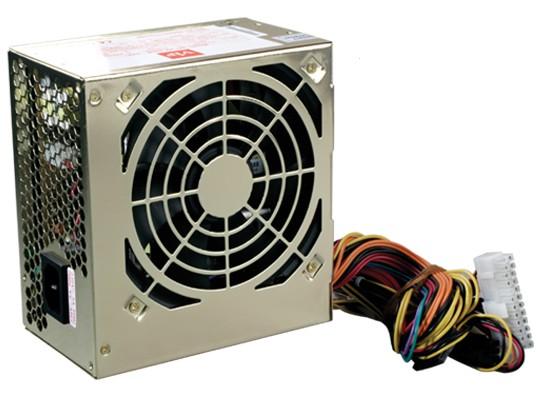
Yes, its all GOLD. After opening the box you’ll just see the GOLD color. Mostly power supplies are in silver color, but this one is according to its model name. Also notice this fan (120 mm). This is a huge fan, and after inserting this in your cabinet, you’ll notice that this fan will point towards the motherboard. At the back side there is just a power socket, to insert your power cable. My previous power supply had its fan at the back side. But this one has a fan which will point downwards.
Expandability wise, this power supply is very good. It has following connectors:
1 x 20+4 Pin motherboard connector
1 x 4+4 Pin +12 V CPU connector
1 x 6 Pin PCI – Express connector (For graphic cards)
4 x SATA Power connectors
2 x Hard disk connectors
And of course a power cord. Some another features written on its box are, high efficiency, low noise, short circuit protection, etc. I doubt whether to believe all this or not.
If you are thinking to buy a graphic card then this 6 pin PCI-E power connector will come to the rescue. You can be future proof if you buy this. But some high end graphic cards needs two PCI E connectors, so take that also into consideration. Till now this power supply is working very smoothly, I have installed it before two days. And it is also very silent. I have not installed any graphic card yet, but I will in the near future.
Pros:
- Really a great VFM(value for money) power supply
- Runs very silent
- PCI Express connector
- Many power connectors
Cons:
- Only 3 years warranty as opposed to some other companies which has 5 years warranty.
- Only One PCI E connector
Final thoughts and Conclusion:
I’ve got this power supply for 2200 Rs. So I think its really a great VFM product. It has only 3 years warranty, whereas some companies offer 5 years warranty, but then what can you expect in a so tight budget. So those on a really tight budget can go for this power supply.
andrew smith says
Got this power supply last yr,i have two pcie connectors,have crossfired two r7 260x and Working smoothly
Aryan Gangawane says
Can it support sapphire hd 6770 1gb ddr5, it is good for this graphics card.
My pc configuration – Intel core i5 2500k 4GB RAM, 1GB Sapphire HD 6770 DDR5 GPU,
Rahul Jawale says
I am an avid fan of VIP PSUs. Have installed atleast 5 different models of VIP in friends’ systems over last 10 years. Never had a single problem. They run silent, generate less heat, and respond well in case of power problems.
User says
I bought same for 1700/- it works well for 3.5 years & one fine morning dead. Not recommend as died in 3.5 years
VINOD says
I bought VIP GOLD 500W PSU 2 yrs back but now it has started to burn everything inside the case. My PC shuts down after few minutes, an hour and mostly when playing games, I have to unplug & re-wire the cables until the system boots normally. I had to RMA my XFX 8800 gt (2nd one) which died few days back. I thought it was a heat issue but wasn’t. I tried this PSU with another PC and that one didn’t boot but it worked fine with my rig……WEIRD. It also used to make squeaking sound when I scrolled my mouse, but it stopped. Power loads affect this PSU in the long run otherwise it’s fine. Will RMA it ASAP.
Final say: It’s a good PSU considering the price. I had no issues for 2 yrs, but always go for extra watts. I should have bought a 600W PSU.
If its under warranty RMA it !
Vishal says
As amd card are not based on the Maxwell architecture they consume a lot of power
So for amd. Cards I personally suggest to go for branded psu such as corsair or cm
Graphic cards like gtx 750ti are cool to run with this power supply
Zein says
I hav VIP 600W PSU it works like a charm
vipul says
hey how many 6 pin connecter your vip 600w psu has pls relpy ha……………pls
SHRIKANT says
I read this review.
I m also having the same VIP 500W PSU purchased from Mumbai in March 2010.
But it is not working since two days. i have observed a seviour Burning at the Power cable Socket and at the PSU rear Plug. It is still in warranty.
PLsease advise ..
bhairav says
The fan does point towards the motherboard but it is to blow air taken from inside the case to the outside!!!
This reduces the thermal temperatures