E-Commerce in India is growing at a very high rate. People are now becoming aware about various online shopping sites in India. Thanks to various online stores, consumers now have more options and they can buy the product from the store that offers the best deal. But the question that may come to your mind is how to automatically compare prices on different stores, without visiting each of them manually? Of course you don’t want to waste time by visiting each sites manually. Fortunately, that’s where price comparison sites come in.
Price comparison sites work great. They check the price of the product on various shopping sites and then present you the result in a single page so that you can know which store is selling that product at what price.
Compare Prices Across Different Online Stores in India
Junglee.com is one such price comparison site for Indian shoppers which is an offering by Amazon. Finally, Amazon has something to offer for Indians and they have started this as a simple price comparison service.
Let’s say you want to search and compare price of a book. Head over to this site and enter the name of the book in the Search box.
On the next page, results will be displayed. The results will also display how many sellers has that book available. In the below example, you can see that 4 sellers has this book.

After clicking on the product, you’ll be taken to the page where you can see different prices on each online store of India. You can see that this book is available at 3 stores – Indiaplaza, uRead and Bookadda and also the prices at those stores are displayed next to it. From this page, you can also see estimated delivery days and whether this product comes with free shipping or not.
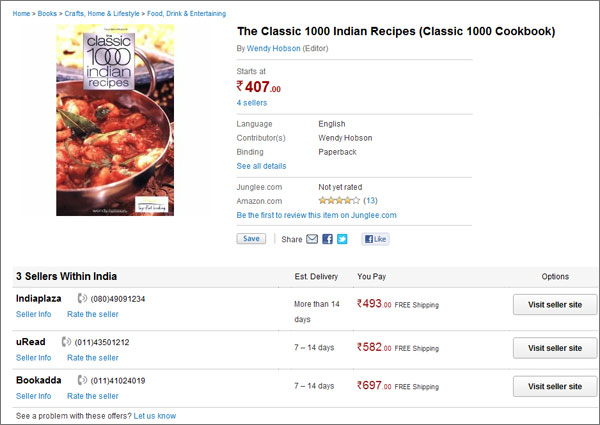
Click on Visit seller site button to visit the product page directly. Now you’ll be redirected to the respective site that you’ve clicked on.
The best part of searching products this way is that instead of searching and manually checking prices on different stores, you can search on just one site (Junglee.com) and then get the results, along with pricing so that you can directly head over to the site that offers the best deal. This definitely saves time and effort.
So now, you don’t have to manually find the best deal, instead just use this price compare site, search for products and save money by getting the best prices ever possible.
Google Chrome extension such as That is Worth can automatically get you notified when prices drop on Amazon, Direct2Drive, Greenman Gaming and Steam.
Also see: How to save money on eBay
Vijaya Satyanand says
Now a days e-commerce business is increasing well. Many people are utilising e-commerce. Let’s the business will increase.