Mind map are easy to create and have long lasting impression, compared to plain, boring text. Mind maps are basically diagrams that can represent ideas, words, tasks or any other thing that the diagram creator can think of, they are built around a central idea. We can call them as small diagrams, but with greater impact compared to text. If you want to create these diagrams in your phone, then here are 4 apps for creating Mind Maps in Android.
The plus point of using mind maps is that they are very easy to create, anyone can create it. There’s no need to think about anything, just jot down all the points that come to your mind.
Mind Map Apps for Android
Mindjet for Android
Visually capture and organize information with Mindjet for Android. Take notes, brainstorm ideas and track tasks from the convenience of your Android device. Take your mind map with you and access it from your device whenever, wherever.

This app features text styling, topic styling, relationships, and tools (attach, links, export, etc.). Here’s a list of what this app can do.
Mindjet Features
- Quick and Easy Information Capture for note taking, brainstorming or creating tasks.
- Comes with powerful features accessible through an intuitive menu.
- Use keywords to organize and sort your Mindjet files
- Sync your Mindjet files from your phone to your PC with Dropbox.
- Add icons and images for context and detail.
- Create relationships between topics.
- Zoom in and out, drag and drop topics and more
Mind Map Memo
Easily create mind maps with “mind map memo”. Creating a diagram is as easy as drawing on paper, everything’s simple with this app.
It includes features like zoom, copy and paste, set node icon, close node, change node color, change background color, import and export to FreeMind. There’s also a Pro version available of this app, for those who want more features.
MindMeister
MindMeister for Android lets you create, edit and share your mind maps on your Android handset and synchronize them with the online MindMeister service, either alone or collaboratively with others. You have complete control whether to share that mind map with others and you can also invite others to edit your mind map.
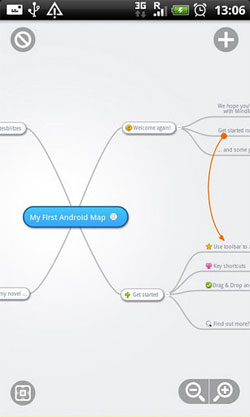
MindMeister (Mind mapping) Features
- Create and edit unlimited mind maps and folders
- Sync maps and folders with your free online account
- Draw connections between nodes
- Add icons, colors, styles and map themes
- Edit and view notes, links and tasks on ideas
- Drag and drop, zoom, pan, etc
This app automatically backs up all your mobile maps with the MindMeister.com service. Therefore, it will prompt you to create a free account. If you’ve previously created mind maps on mindmesiter.com, then you will be able to view all your mind maps on your Android phone also.
For now, this app works only on smartphones and not on tablets. Android tablet users will have to wait for compatibility.
Connected Mind
This mind mapping application gives you complete control over the layout of your maps. You draw each branch by hand in a single stroke of your finger, taking any path you want. Your stroke is then smoothed to create a flowing curve which you can tap and adjust if you need to. This app makes it easy to create a mind map, a finger is all you need to do wonders.

Each main branch from the central idea of the mind map is assigned a different color, picked a random from a palette of suitable colors. You are free to change this to any color you desire, using the fully-featured color picker. You can also add a range of shapes and even images, which can be clipped to any of the available shapes.
Connected Mind is a paid app which costs $ 0.99.
Related: Create Mind Map Online
Leave a Reply