We already know that an IP address (short for Internet Protocol address) is used to identify computers on the Internet. It’s unique for each and every computer that is connected to the internet. Google can now show you IP address also. There are some sites that already does this task, but now this is made even simpler.
Your computer may not be using static IP address, which means that IP address change every time you login. Here comes a new feature from Google, which will directly show your IP address in search results page. No need to click on any search results and go on any other site.
Finding IP Address using Google Search
Of course you can know your IP address by checking properties of LAN (local area network). But those who are not familiar with this, can just start any browser, open Google.com and type “my ip“.
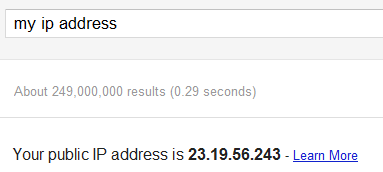
So all you need to do is to just type “my IP” or “what is my IP” in Google search and Google will display your IP address right on top of the search results.
More details on this new feature is available from here.
Leave a Reply