Google plus or G+ is the latest social networking site from Google. So if you are on Google plus, and want to get rid or delete your Google plus account, then yes you can. Don’t worry, as it will not delete your Google account or Gmail or any other Google services. If you follow this method correctly, then you can delete your G+ account only, and other Google services will stay intact. So let’s get started.
Follow this procedure to remove only Google+ Plus account without deleting Google account
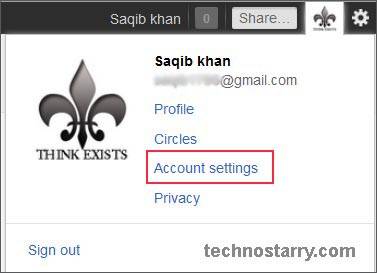
- Login to your Google plus account, and from the top right side, click on your Name, and then click on Account Settings. (Refer screenshot below)
- Account Overview section will open by default. Scroll down and you will see Services section. Click on Delete Profile and remove associated social features.

- From this screen, click on Delete Google + content. And then finally click on Remote Selected Services button below.
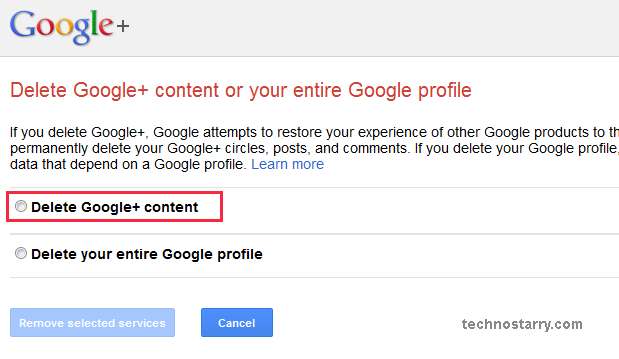
If you follow these steps correctly, then only Google + account will be deleted/removed. And all your other Google products will remain as it is.
Remember: Don’t ever click on “Delete your entire Google profile”. And things done, cannot be undone. So be sure that you want to remove Google plus account, as later, it cannot be restored.
New to Google plus ? Why not refer this Google+ Plus getting started guide.
Linda says
I tried this method before, but if you try to create a Google+ account again with the same email address linked, it automatically reopens your original profile you deleted. I don’t want this to happen; I want it permanently, and really permanently gone. Is there a way to not let this happen?
Carlo says
Thanks for the guidance!
I’m wondering, if I remove my Google+ account will the person who invited me be able to re-invite someone else, so that the invitation they gave to me isn’t wasted??
monkeymynd says
Do you know if this method would remove the profile from the Google+ search as well?
I started out with two accounts. One using an pseudonym and one using my real name. When I got my profile flagged for using a pseudonym, I had to change it to my real name. Now, I have two accounts with the same name and both come up when searching G+. I’d prefer to have only one of the accounts show in the results because I don’t want to manage two profiles.
Any suggestions?
Saqib says
I think if you follow this method and delete your Google+ account, then after some time, the same account will also be removed from the search results.