Enjoying movies on your iPhone, iPad, iPod touch is one of the greatest pleasures of these Apple apparatuses. But you are confronted with the two problems: limited memory and limited video formats. So you can not put every favorite video in iDevice for watching. To help you eliminate these problems, here comes a free video streaming app, named Air Playit.
Air Playit is capable of streaming video to iPhone, iPad, and iPod touch from your PC/Mac over WiFi, 3G and 4G networks. So you can remotely play and watch these videos in iDevice without utilizing any storage space or any limitations of video formats. It comprises two components: Air Playit Server that runs on your PC and App Client that runs on your iDevice. The two parts will intimately interact to fulfill the task of streaming videos. Below is a full explanation of how Air Playit works.
How to Stream Video to iPhone with Air Playit?
Step1:
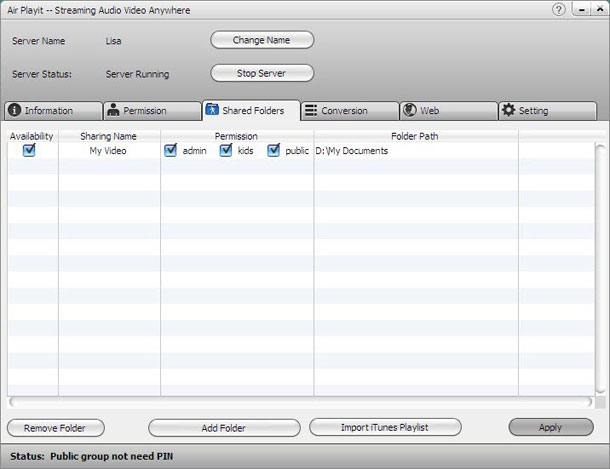
Set up Air Playit Server on your computer and add video to “Shared Folders” by clicking “Add Folder” or “Import iTunes Playlist”. If you’d love to share your server with your friends, you may also set the permission for each video folder and modify the PIN in the “Permission” area.
Step2:
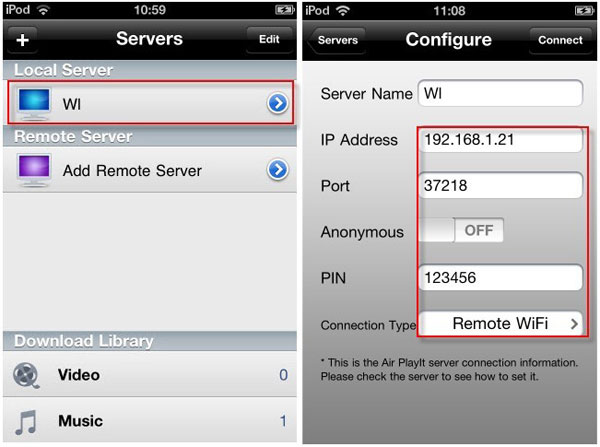
Install App Client on iPhone and add your server by clicking “+”. Usually, the client can automatically discover the local network by Bonjour Server. You may also manually fill in IP Address, Port and PIN, etc. You may find these information in the “Information” part in the interface of Air Playit Server.
Step3:
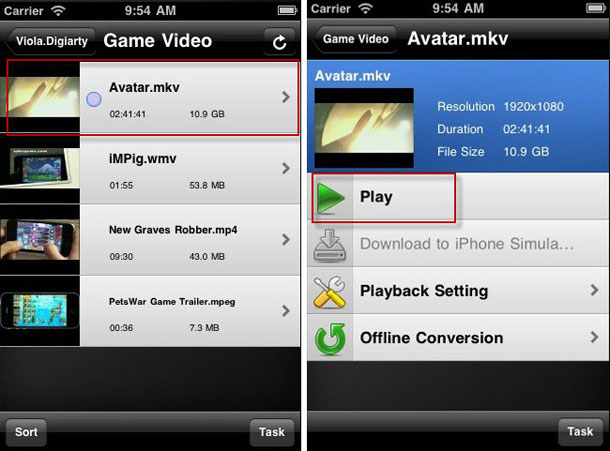
Browse this folder under your server; choose the video you want to watch by clicking “Play”. Then you may play any video in iPhone, even Apple incompatible video. Isn’t this great. Now no more worrying about compatible format.
Key Features of Air Playit:
- Live convert video to suitable formats if the video is incompatible with iDevice.
- Offline conversion – allow you to add video conversion task on iDevice or server, and download these videos to iDevice via WiFi, 3G and 4G networks.
- Download video & music to iPhone iPad iPod touch on air.
- Built-in HTTP server, it lets you access the audios and videos stored on your PC via any web browser.
- Support TV Out. You can watch these videos on home TV via iPhone, iPad.
- Remotely power off computer on iPhone, iPad anytime.
- Automatically list the recent played videos and remember the last play point for each video.
Air Playit is like your personal cloud system which allows you to access your video, music and photos collections anywhere without taking up the capacity of your iDevice.
Update: Air Playit for Android is also now available. Air Playit is upgraded with CUDA technology. The benefit is that, you can stream and enjoy real-time music and video playback from your PC/Mac, all media presented on your Google Android phone seamlessly via WiFi, 3G/4G network, regardless of media format or file size. The ability of multi-tasking music background playback is also added which guarantees smooth music playing even in case of screen lock.
Download Air Playit Server and App Client
Download Air Playit Server (PC version)
App Client for iPhone
App Client for iPad
Leave a Reply